
FAQs
1. Switches – FAQ
Add Your Heading Text Here
What
types of Ethernet switches does Atrie offer?
Atrie offers a range of PoE, Non-PoE,
Solar-Powered, Enterprise, and Fiber Ethernet Switches for telecom,
enterprise, surveillance, industrial, and outdoor networking applications.
What
is the difference between PoE and Non-PoE switches?
PoE switches
provide both Ethernet data and electrical power through the same Ethernet
cable, while Non-PoE switches provide data connectivity without PoE
power delivery.
What
PoE standards are supported?
PoE support depends on the specific switch model
and may include standards such as IEEE 802.3af, 802.3at, and 802.3bt.
Please refer to the individual product datasheet for supported standards.
Can
Atrie switches support fiber uplinks?
Yes. Selected models support SFP/SFP+ fiber
uplink interfaces, depending on the product configuration.
Are
managed switches available?
Yes. Atrie offers managed switches with features
such as VLAN, STP/RSTP/MSTP, QoS, LACP, SNMP, and other network management
functions, depending on the model.
2. SFP & Optical Transceivers – FAQ
What SFP speeds are available?
Atrie offers optical transceivers covering a broad range of data rates, from 1G to 800G, depending on the application and form factor.
What fiber types are supported?
Depending on the module, Atrie transceivers support single-mode fiber (SMF) and/or multimode fiber (MMF).
What transmission distances are available?
Transmission distances vary by product and application, ranging from short-reach connections to long-distance optical links of 80 km and beyond for selected modules.
Which wavelengths are available?
Common wavelengths include 850 nm, 1310 nm, and 1550 nm, with the actual wavelength depending on the transceiver type, transmission distance, and application.
Are Atrie SFPs compatible with third-party switches?
Atrie transceivers can be supplied for compatibility with various networking platforms. Compatibility should be verified based on the switch model, vendor coding, optical specifications, and required firmware/configuration.
3. Copper LAN Extender – FAQ
What is a Copper LAN Extender?
A Copper LAN Extender enables Ethernet
connectivity over existing copper telephone lines, allowing organizations
to extend network services without installing new Ethernet cabling.
What distance can a copper LAN extender support?
The achievable distance depends on copper cable
quality, wire gauge, line condition, interference, and selected data rate.
Refer to the product datasheet for specific performance figures.
Can it work over existing telephone copper infrastructure?
Yes. Copper LAN Extenders are designed to utilize
existing copper infrastructure for extending Ethernet connectivity.
Does the achievable bandwidth depend on distance?
Yes. In most copper-based transmission
technologies, higher transmission distances generally result in lower
achievable data rates.
4. Fiber LAN Extender – FAQ
What is a Fiber LAN Extender?
A Fiber LAN Extender extends Ethernet
connectivity over optical fiber, providing longer-distance and electrically
isolated network connections.
What fiber types are
supported?
Depending on the model, Fiber LAN Extenders
may support single-mode or multimode fiber.
What transmission
distances are supported?
Distances depend on the optical interface and
module. Typical configurations can support multiple
kilometers to tens of kilometers.
What are the
advantages of fiber LAN extension?
Fiber provides long-distance
connectivity, high bandwidth, electromagnetic interference immunity, and
electrical isolation, making it suitable for telecom,
industrial, surveillance, and enterprise networks.
5. Media Converter – FAQ
What is a media converter?
A media converter converts network signals
between different physical media, typically Copper Ethernet
and Fiber Ethernet.
Why use a media
converter?
Media
converters allow existing copper Ethernet networks to connect to fiber
infrastructure without replacing the entire network equipment.
What speeds are
supported?
Depending on the model, Atrie media converters
can support 10/100M, Gigabit Ethernet, and higher-speed interfaces.
What fiber connectors
are available?
Depending on the product, interfaces may
include SC,
LC, or other optical connectors.
Can media converters
support long-distance fiber links?
Yes. The supported distance depends on the
optical transceiver, fiber type, wavelength, and link budget
6. Ethernet / Protocol Converters – FAQ
What is an Ethernet converter?
An Ethernet converter enables connectivity
between different network interfaces or transmission technologies to support
integration between legacy and modern networks.
What interfaces are
supported?
Depending on the product, interfaces may
include Ethernet,
E1, V.35, RS-232, RS-485, and other serial or telecom interfaces.
Can legacy telecom
equipment be connected to an Ethernet network?
Yes. Protocol and interface converters can
enable integration between legacy telecom interfaces and modern Ethernet
networks, depending on the supported protocols.
Multi-service access node (MSAN) - FAQ
1. The SNMP manager server cannot get information from the management card
a) Ping the management card from the SNMP server. If you cannot, check the cable, connections and IP configuration. b) Check to see that the community (or trusted host) in the management card matches the SNMP server’s community. c) Make sure that your computer’s IP address matches a configured trusted host IP address (if configured).
2. I cannot telnet into the management card.
a) Make sure that a telnet session(s) is not already operating. The management card only accepts one telnet session at a time (or a total of four Telnet and SSH sessions with multiple login enabled).
b) Make sure that your computer’s IP address matches a configured secured client IP address (if configured). The management card immediately disconnects the telnet session if secured host IP addresses are configured and your computer’s IP address does not match one of them. c) Make sure that you have not disabled the Telnet service or changed the server port number that the management card uses for Telnet. d) Ping the management card from your computer. e) If you are able to ping the management card but are still unable to telnet, contact the distributor. f) If you cannot ping the management card, check the cable, connections and IP configuration.
b) Make sure that your computer’s IP address matches a configured secured client IP address (if configured). The management card immediately disconnects the telnet session if secured host IP addresses are configured and your computer’s IP address does not match one of them. c) Make sure that you have not disabled the Telnet service or changed the server port number that the management card uses for Telnet. d) Ping the management card from your computer. e) If you are able to ping the management card but are still unable to telnet, contact the distributor. f) If you cannot ping the management card, check the cable, connections and IP configuration.
3. I cannot use the console port to access the management card.
Make sure you use terminal emulation software with the correct settings. The default settings are VT100 terminal emulation, 9600 bps, No parity, 8 data bits, 1 stop bit, and no flow control; although you can use the commands to configure the console port speed.
4. The Gigabit Ethernet interface’s LED is on, but data cannot be transmitted.
a) Ping the management card from a computer behind the connected uplink or downlink Ethernet device. b) If you cannot ping, check the Ethernet cable and connections between the uplink or subtending port and the Ethernet switch or router. c) Make sure the port has the appropriate uplink or subtending mode setting. d) Make sure the system’s IP settings are properly configured. The management card and the peer Ethernet devices must be in the same subnet. e) Check the VLAN configuration. The Gigabit Ethernet port must be a member of the same VLAN as the traffic you want to send through it.
5. I resolved a network loop problem on a switch connected to an ATR4800 port but the ATR4800 port still does not send or receive data.
The port may have the loop guard feature enabled. Loop guard shuts down a port if it detects a network loop on it. After resolving the loop problem on your network use the related port setup or switch port setup Web Configurator screen or the commands to re-activate the disabled port.
6. The ports in an n-wire group cannot send or receive data.
The port may hMake sure all the SHDSL ports in the n-wire group use the same SHDSL profile and are connected to the same remote SHDSL device.ave the loop guard feature enabled. Loop guard shuts down a port if it detects a network loop on it. After resolving the loop problem on your network use the related port setup or switch port setup Web Configurator screen or the commands to re-activate the disabled port.
7. I cannot get a redundant (second) management switch card to work as a standby. I resolved a network loop problem on a switch connected to an ATR4800 port but the ATR4800 port still does not send or receive data.
a) Make sure that the management switch cards are in slots 6 and 7 in the 4812 main chassis (4812), or slots 8 and 9 of the 4817 main chassis. The two management switch cards must have the same types of uplink and subtending connections. b) Make sure that the management switch cards both have the same firmware version.
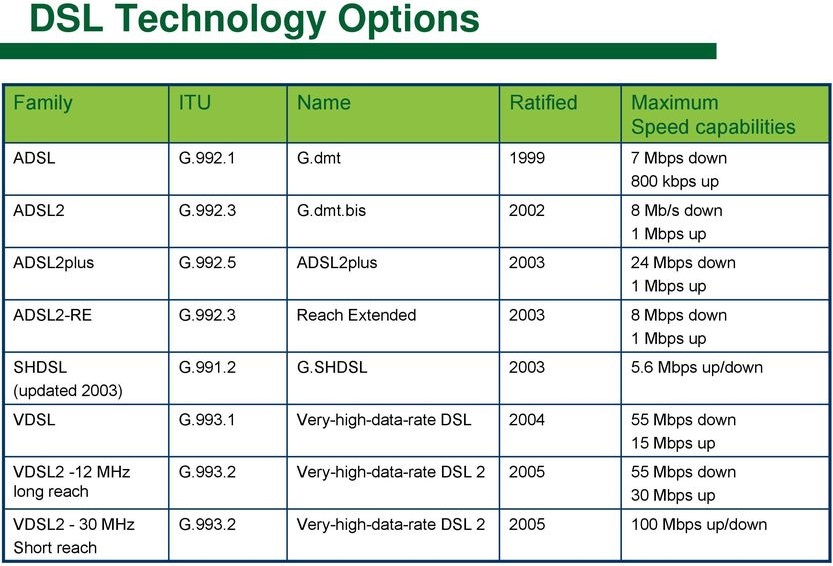
8. DSL Technology Evolution